
ChatGPT ads used to mean one advertiser, one product, one hand-built ad. OpenAI announced product feed ads in May 2026, and feeds are now managed in Ads Manager (PPC Land): retailers hand over a product catalogue and the system generates the ads. Since August, some of those ads show up as a carousel of several products in one slot.
If you’re already running product feed campaigns, here’s the short version. Ads Manager tells you how your ads performed. It doesn’t tell you which prompts your products showed on, which ones they missed, or what your competitors are running. Metistic tracks exactly that, including the products and prices competitors show, and you can start free with 10 prompts.
Below: what product ads are, why they’re worth running, and how Metistic shows you where they actually appear.
What are ChatGPT product ads?
ChatGPT product ads are sponsored placements generated automatically from a retailer’s product feed, rather than written one by one. You upload a catalogue, set rules for which products are eligible, and the system builds ads from the product names, images and attributes already in the feed (Search Engine Land). New to ChatGPT ads in general? Start with how ChatGPT ads work.
For the person chatting, nothing about the placement changes. Product feed ads sit in the same slot as any other ChatGPT ad: below the answer, labelled as sponsored (Digiday). What changes is the format. OpenAI’s help centre says product ads can show product images, titles, star ratings, prices, sale prices and your brand (OpenAI Help Center).
Two details are easy to miss:
- Feed products are ads-only for now. During the beta, products uploaded through an Ads Manager feed are eligible for ads but won’t appear in organic ChatGPT answers. OpenAI says that may come later.
- Organic and paid are separate pipes. Before feed ads existed, retailers could already share catalogue data so ChatGPT could show accurate prices and availability in answers. That data couldn’t be used for advertising (Search Engine Land).
So a brand can now be in a ChatGPT shopping conversation two ways: mentioned in the answer, or paid for underneath it. Those are different things, and they don’t always line up.
How a product feed campaign is set up
Setting one up takes a feed, a campaign, an ad group with product filters, and one ad template. This is the flow as OpenAI’s help centre describes it today (OpenAI Help Center):
- Create a feed. In Ads Manager, go to Tools, then Feeds, then Create Feed. The feed has to follow OpenAI’s product feed specification.
- Import products. Upload a CSV or TXT file, point to a hosted HTTPS URL, or connect over SFTP. Items expire after two weeks, so a hosted URL or automated SFTP is the sensible default for anything but a quick test.
- Wait for validation. Processing takes minutes to hours depending on feed size. Upload History shows errors.
- Create the campaign. Choose “Product feed” as the campaign type. Geographic targeting and exclusions are country-level only for new product feed campaigns.
- Build ad groups and filter products. Pick the feed and apply filters to decide which products each ad group can use. For your own groupings, add custom labels in the
ads_metadatafield, such as a bidding tier or product line. - Set the bid strategy. “Maximize results” is the default for eligible new ad groups and adjusts bids automatically toward clicks or conversions.
- Add one ad template. Right now the template only lets you choose the image field. Titles and descriptions come from the feed, so check the preview.
- Review and launch. Confirm the product count matches what you expect, then submit for review.
Two practical notes. Feed counts (Ingested, Processed, Not approved, Ready) describe offer records, not unique products, so subtracting them won’t give you an accurate missing-product total. And “Not approved” is an aggregate count with no per-item reason.
Feed quality is now ad quality. If a title is vague or an image is weak in the feed, it’s vague or weak in the ad, because there’s no separate creative step to fix it. For the wider rules on copy and campaign structure, see ChatGPT ads best practices.
Product carousels: several products, one slot
In August, Digiday verified a carousel format that puts several products into a single ChatGPT ad placement, at the bottom of the conversation where a single ad would normally sit (Digiday). Before that, ChatGPT had mostly run one format: headline, short description, image and link.
Three things matter for advertisers:
- You don’t choose the format. Digiday reports that whether a single product ad or a carousel is shown is decided inside OpenAI’s ad system, not by the advertiser.
- One retailer per carousel, for now. At the time of reporting, a carousel only showed items from one retailer. Digiday notes the mechanics could support competing retailers side by side later.
- It’s built for Q4. The format landed ahead of the holiday season, the biggest quarter for ad spend.
If carousels do start mixing retailers, the question shifts from “did my ad show?” to “did my product show, in which position, and next to whose?”
Timeline of ChatGPT ads so far
Product feed ads were announced about a week after self-serve buying opened, and the format has moved quickly since.
| Date | What changed |
|---|---|
| 30 Oct 2026 (upcoming) | Creative enhancements switch on by default: OpenAI can rewrite, resize and translate ads without approval (OpenAI Help Center) |
| 21 Oct 2026 | Ads expand to 26 more countries, 89 in total (CNBC) |
| Oct 2026 | Visual display ads next to generated images, US only, test group of advertisers (TechCrunch) |
| 6 Aug 2026 | Product carousels spotted and verified: several products in one ad slot (Digiday) |
| May 2026 | Product feed ads announced: ads generated from retailer catalogues (Search Engine Land) |
| 5 May 2026 | Beta self-serve Ads Manager and CPC bidding (OpenAI) |
| 9 Feb 2026 | Ads pilot starts for Free and Go users (NBC News) |
Why you should run ChatGPT product ads
If you sell online, ChatGPT is now a place buyers go to compare products and decide. Product ads put your catalogue in that moment.
- Feed ads are among OpenAI’s strongest performers. OpenAI says ads built from product feeds have been among the strongest-performing in its programme to date (OpenAI Help Center).
- They reach buyers mid-decision. Ads are matched to the conversation, not a keyword list, so they show up while someone is still weighing their options. We compare the two channels in ChatGPT ads vs Google Ads.
- Setup is one feed, not hundreds of ads. Upload your catalogue once and the system builds ads from your titles, images and prices. Keep the feed updated and your ads stay current.
- The reach keeps growing. Ads now run in 89 countries (CNBC), and ChatGPT has around 1.2 billion weekly users (TechCrunch).
- Advertisers are arriving fast. OpenAI’s ad business passed a $1 billion annualised run rate in August (CNBC). Learning the channel now is cheaper than learning it once it’s crowded.
- Q4 is when it counts. Carousels landed ahead of the holiday season, and agencies report OpenAI pushing feed-based ads for Q4 (Digiday).
There are honest caveats. Ads Manager shows clicks, spend and which products delivered, but not the conversations behind them. Benchmarks are thin because the channel is months old. And from 30 October, OpenAI can rewrite your ads by default unless you opt out.
None of that is a reason to sit it out. It’s a reason to watch what actually shows up, which is where Metistic comes in.
How Metistic helps you with product ads
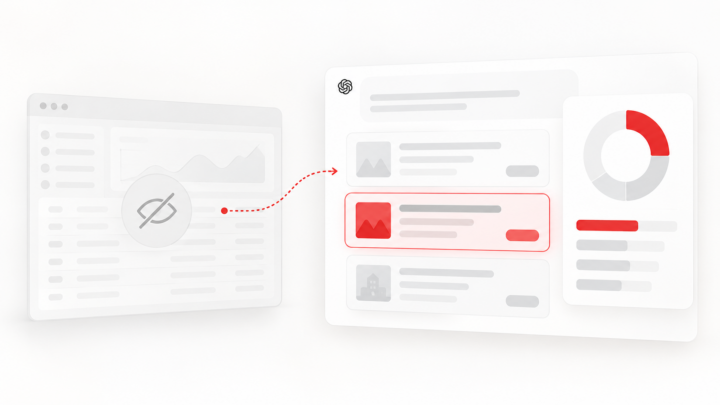
Product ads are easy to launch and hard to see. Ads Manager reports your clicks and spend, but not where your products appeared, where they didn’t, or what competitors ran instead. Metistic fills that gap, and it doesn’t need access to your ad account.
What Ads Manager doesn’t show you
Ads Manager reports on your own delivery. It can’t show you the prompts behind it, or what competitors were doing in the same conversations.
| Ads Manager | Not in Ads Manager | |
|---|---|---|
| Your impressions, clicks, CTR | Yes, refreshed roughly every 15 minutes | |
| Spend | Yes, delayed roughly 7 to 8 hours | |
| Which products delivered | Yes, in the Products tab, up to 7 hours after delivery starts | |
| Which prompts your products showed on | Not reported | |
| Prompts where you didn’t show | Not reported | |
| Which competitors showed instead | Not reported | |
| Brands named in the answer above your ad | Not reported |
Reporting timings are from OpenAI’s help centre (OpenAI Help Center). The Products tab is also a reporting view, not an inventory: a product only appears once it has delivery data, so an empty tab doesn’t mean your feed failed.
This gap isn’t a flaw in Ads Manager. OpenAI keeps conversations private and separate from advertisers, and its ads principles are built around that (OpenAI). But it does leave advertisers without the conversation-level view they’d expect from search. We go deeper on this in how to measure ChatGPT ad visibility and ChatGPT share of voice.
How to track ChatGPT product ads
The only way to see which prompts trigger product ads is to ask those prompts repeatedly and record what shows up. One check tells you almost nothing, because ad delivery varies by run, account and market. Our practical guide to tracking ChatGPT ads covers the method in depth, and which prompts trigger ChatGPT ads looks at how ads are matched to conversations.
If you’re doing it by hand:
- Write the prompts your buyers actually use. “Best noise-cancelling headphones under £200” is a better test than your brand name. Group them by intent: comparison, recommendation, budget, use case.
- Run each prompt many times, across days. Log whether an ad appeared, whose product it was, single or carousel, and the price shown.
- Record the misses. A prompt where no ad shows, or where a competitor shows instead of you, is the most useful row in the log.
- Note who the answer names. If the answer recommends three brands and the ad underneath is a fourth, that’s worth knowing.
- Report a rate, not a screenshot. “Appeared in 14 of 30 checks” is evidence. “I saw it once” isn’t.
This gets heavy fast. Ten prompts, run ten times a week, in two markets, is 200 checks a week before you’ve added a single competitor.
What Metistic tracks for you
For a retailer running product feed campaigns, that means you can see:
- Which prompts your products show on. Each prompt gets a presence rate built from daily checks, with the number of checks behind it. A 62% presence rate on a headphones prompt, for example, came from 92 checks, not one lucky screenshot.
- Where you’re missing. Prompts where competitors appeared and you didn’t are kept separate from prompts where no ads were seen at all, so you know which gaps are worth chasing.
- Who showed up instead. Every advertiser recorded on your prompts, including brands you didn’t know to look for.
- The markets you sell in. Track prompts in 53 markets, which matters now that feed campaigns target by country.
- No ad account access needed. Start with your website, a market and your prompts.
Tracking competitor product ads
Ads Manager only shows your own campaigns. Metistic’s competitor tracking shows what your competitors run on the same prompts, based on what actually appears in conversations. For the manual approach, see how to track competitors on ChatGPT.
- Their products and prices. Product ad tracking records the product, the price exactly as ChatGPT displayed it, the advertiser, the image and the destination, with the prompt, market and date attached.
- Every price change. Each competitor product ad keeps a dated price history, so you can see when a rival drops a price or runs a sale and line it up with your own promotions.
- Where they’re bidding. Which prompts each competitor appears on and how often their ads are recorded. A brand that’s strong on budget questions may barely show on another use case.
- Their creatives. The ad creative library keeps the copy, images and destinations competitors ran, so you can compare their message with the buying question.
- Alerts when things change. On paid plans, get updates by email or Slack.
Metistic can’t see inside a competitor’s Ads Manager, so their budgets and bids stay private. What you get instead is where and how often their ads actually show, which is the part your buyers see.
Why this matters more from 30 October
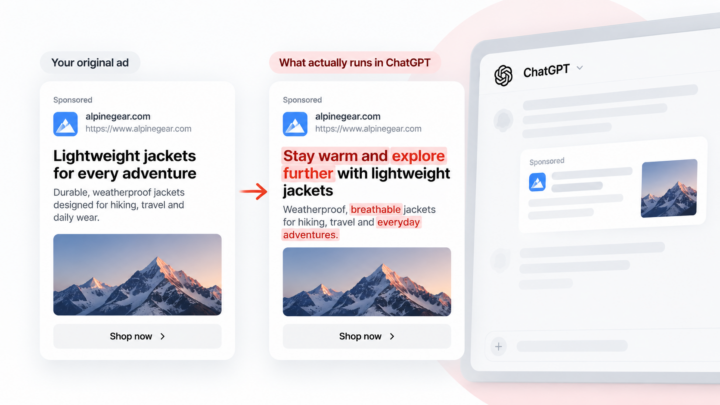
From Friday 30 October 2026, OpenAI switches on creative enhancements by default for new and existing campaigns. The system can rewrite headlines and descriptions, resize images, change destination URLs and translate ad text, and those versions can run without the advertiser approving each one (OpenAI Help Center).
So the ad your buyers see may not be the one you wrote, and the same goes for your competitors. The only way to see which versions actually ran is to watch the conversations. Metistic records each ad as it appeared, so you can see the versions that actually ran, yours and your competitors’.
A starter set for one product category
If you sell headphones, your first 10 prompts might look like this:
- best noise-cancelling headphones under £200
- best wireless earbuds for running
- Sony vs Bose headphones for travel
- headphones for working from home with a good mic
- best budget over-ear headphones
- is [your brand] good for gaming
- best headphones gift for a teenager
- best earbuds for iPhone
- comfortable headphones for small ears
- what headphones should I buy for long flights
Mix comparison, budget, use-case and gift prompts. Gift prompts matter most heading into Q4, the biggest quarter for ad spend.
Start free. The free plan covers 10 prompts in one market, checked daily, no card needed: enough for the starter set above. On Free you see your own product ads, plus how many competitor product ads appeared and some of who ran them. To see every competitor product ad with its price history, move to Starter or Growth. Start tracking free.
Running ChatGPT ads for clients? See Metistic for agencies.