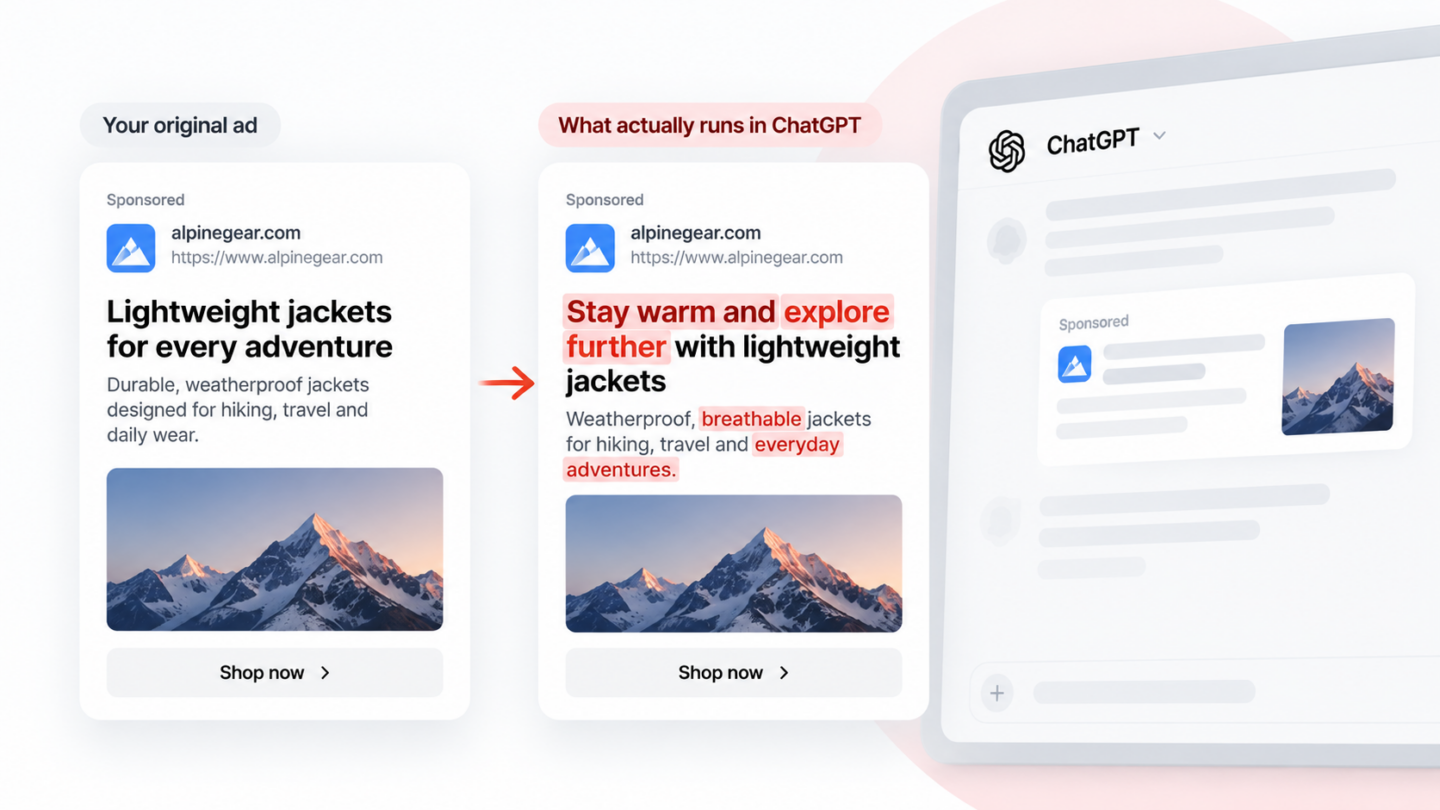
From 29 October 2026, OpenAI is switching on ChatGPT ads creative enhancements for every self-serve campaign, new and existing, unless you opt out. Once it’s on, ChatGPT can rewrite your headline and description, translate them, resize your image and send the click to a different page on your site.
Those variations can run without you seeing or approving them first. OpenAI’s help article gives 29 October; the email advertisers received gives 30 October, as reported by Search Engine Roundtable. Either way, you have about a week to decide.
What ChatGPT ads creative enhancements can change
Four parts of your ad are now open to change.
| Ad element | What ChatGPT can do |
|---|---|
| Headline and description | Write new or reworded copy that ties your offer to the conversation |
| Language | Translate your ad text into another language |
| Image | Resize it to fit the ad format |
| Destination URL | Send the click to a different page on your site that it judges more relevant |
The rewrites draw on three things: the conversation or the user’s interests, your original ad, and your landing page. Some variations may be prepared in advance. Others may be generated live, mid-conversation.
That means your landing page now helps write your ads. OpenAI’s advice is to keep prices, promotions, product details and availability on the page current. A promotion that ended last month can turn up in a rewritten headline.
OpenAI’s own example takes a grocery delivery ad and rewords it for someone asking about quick weeknight dinners. Same offer, new framing. OpenAI also says ads don’t influence ChatGPT’s answers, so this changes the ad, not the response above it.
ChatGPT ads reporting: you won’t see what ran
You’ll know how your ads performed, but not what they said. OpenAI confirms there’s no preview of every variation, and you don’t approve them before they run.
Ads Manager reports impressions, clicks, spend, CTR and attributed conversions at campaign, ad group and ad level. The only breakdowns are device, country and platform, according to OpenAI’s Measure Results guide. Nothing splits results by variation or by language, and nothing shows the conversation an ad appeared in.
OpenAI is also candid about measurement. It notes that a change in your metrics over time doesn’t, by itself, show the enhancements caused it. So if CTR moves, you won’t know which wording or which landing page moved it. And if a variation says something you’d never have signed off, you’ll hear it from a customer, if at all.
You probably can’t check for yourself either. OpenAI doesn’t show ads to Plus, Pro or Business users. If your marketing team uses paid ChatGPT, they won’t see your ads, rewritten or not.
Who should care most
Anyone whose ad wording or landing page is there for a reason.
- Regulated categories. Finance, health and legal advertisers, the US-only categories OpenAI approves case by case, usually have copy signed off by compliance. A rewrite you never saw still runs under your name. OpenAI’s policies apply to all ad assets, including copy, but it hasn’t said how rewritten variations are reviewed.
- Agencies. Clients will ask what ran on their behalf. “Something ChatGPT wrote from our ad” is a hard answer to give in a monthly report.
- Campaign-specific landing pages. If a campaign points to a promo page, a market-specific page or a page your tracking depends on, a swapped destination can send people somewhere it wasn’t built for.
- Advertisers in several markets. Translation means copy in languages your team may never have reviewed.
Opt out, or leave it on?
You can switch it off before the 29th or change it any time afterwards, in Ads Manager under Manage settings. There’s an account-level default and a campaign-level setting, and the campaign setting wins. If you’ve already opted out, OpenAI says that choice is kept.
That gives you a sensible middle path:
- Set the account default to off.
- Turn it on for one campaign where performance matters more than exact wording.
- Compare it against a similar campaign with enhancements off, over the same dates.
Running both side by side gives you a cleaner read than a before-and-after, which OpenAI itself warns won’t prove much. Keep anything with legally approved copy, or a landing page that has to be the landing page, switched off.
How to monitor ChatGPT ads if you leave it on
The only way to see where your ChatGPT ads appear, and what they say, is to look at real conversations. Four things are worth checking:
- Claims. Does the rewritten headline promise anything your original ad and landing page don’t?
- Destinations. Which pages are clicks being sent to now?
- Languages. Is your ad appearing in translation, and does it read properly?
- Competitors. Their ads will be rewritten too, unless they’ve opted out. The ad sitting next to yours on a given prompt may look different from one conversation to the next.
For destinations, there’s a free check. Add UTM parameters to your landing page URLs, which OpenAI says persist on ad clicks, and use the {ad_id} macro in Ads Manager’s landing page query parameters. Then watch which pages receive ChatGPT-tagged sessions in your analytics. OpenAI hasn’t said whether parameters carry over when it changes the destination, so treat missing sessions with care.
That’s what ChatGPT ad monitoring with Metistic does. We run the prompts your customers ask in real ChatGPT conversations and record every ad that renders: advertiser name, headline, description, image and destination URL, alongside the prompt it appeared on. You see the wording ChatGPT actually used and where it sent people, for your ads and your competitors’.
To be straight about the limits: we see the conversations we run, in the markets we cover, on ChatGPT on the web. That’s a sample, not every variation ChatGPT will ever generate. Every rate we show comes with the number of conversations behind it, so you know how much weight it can bear.
Decide before the 29th
Check your account default and each campaign’s setting this week. Switch it off wherever wording or destination has to stay fixed. If you leave it on anywhere, make sure you can see what runs.
Metistic has a free plan: 10 prompts in one market, no card required. Add the prompts that matter to you at metistic.com and see the ads ChatGPT actually shows for them. We cover 53 markets, including Japan, Korea, Germany, France and Finland, which matters now that ads can be translated.